Showing posts with label azure. Show all posts

Automate your workflows with Power Automate and Azure Logic App

Why you need Power Automate and Azure Logic App for your enterprise


All companies are built by people. Their employees are the foundations that keep the business sustainable and growing. Ideally, your staff will spend most of their time to collaborate, share knowledge and be productive by focusing on your company’s core business. However, manual and repetitive tasks are still common and could limit your employees potential.


  • As a business decision maker, are you constantly waiting for your staff to update various data sources for your reports?

  • As a resource manager, have you been spending too much time on administrative follow ups of your employees?

  • As a process manager, are you overwhelmed by the email threads being exchanged to approve or reject specific requests?

  • As an administrative assistant, are you struggling to keep up with email requests to organize?


If those sounds familiar, and even if they don’t, you need to consider automating your workflows. Hence comes Microsoft Power Platform’s Power Automate, which was previously named Microsoft Flow.


What is the Power Platform?


Microsoft Power Platform overview diagram from docs.microsoft.com


Microsoft Power Platform comprise these applications:
  • Power BI: create dashboards and reports for data analysis from multiple sources.
  • Power Apps: easily build apps that can run on multiple devices, web or mobile.
  • Power Automate: automate workflow without code connecting to popular services.
  • Power Virtual Agents: quickly build chatbots, coding-free.

The Power Platform is designed to simplify the creation of fully functional solutions free of coding by business users. These products leverage the Common Data Service (CDS), an abstraction layer for secure data storage and management over Azure. The CDS enforces business rules and automation against the data, and simplifies the provisioning of resources on the Cloud, by exposing the Common Data Model (CDM), a set of standardized metadata definition to provide data consistency across applications and business processes.

Power Automate provides an user-friendly interface over Azure Logic Apps, the first targeting business users and the later, IT professionals and developers.


What is Azure Integration Services?


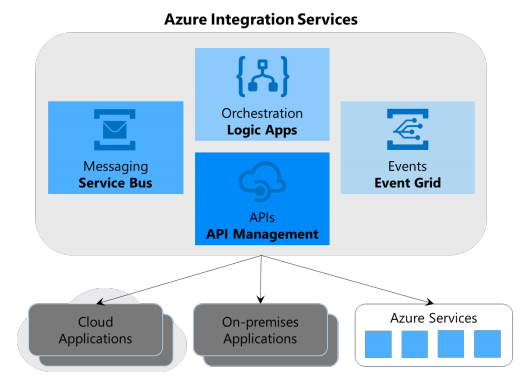
Azure Integration Services overview diagram from Microsoft white paper


Azure Integration Services is a set of cloud services for enterprise integration:
  • API Management: an API service that handles requests volume, security control, responses caching and monitors usage patterns.
  • Logic Apps: serverless technology to create multi-steps processes to connect two or more applications, for system-to-system or user-to-system workflows.
  • Service Bus: an enterprise message queueing system to allow non-blocking interactions between application components.
  • Event Grid: a highly scalable service that invokes receivers when a particular event has occurred, removing the need for applications polling.

Azure Integration Services lets you connect cloud and on-premises applications, but the real value is when all core services are used together. As an example, your customers submit orders through your Web site, going through the Service Bus they then generate an Event Grid which triggers a Logic App to execute your business process. This could involve querying your CRM, updating on-premises inventory and creating transactions on SAP. By leveraging the Azure Integration Services, your IT team could save a lot of development time and simplify maintenance.

Why automate workflow?


Going back to our workflow and process challenges, we will focus on Power Automate and Azure Logic App. So how can Power Automate or Azure Logic App help your workflow processes?


Use CasePower Automate / Azure Logic App Example
Decision maker has to wait for a report.Update Power BI dataset when a file is updated.
Resource managers need to follow up constantly.Track Microsoft Forms responses in Sharepoint and send notification.
Process manager overwhelmed by approval threads.Use approval email workflow to redirect to proper channel.
Administrative assistants with too many email requests to organize.Filter and save email content or attachments automatically into Sharepoint or organized folders.


These are just a few basic examples of the functionalities available. More advanced features include:

  • Track Tweets about a particular keyword and stream their sentiments to Power BI for analysis.

  • Open a bug in Azure DevOps and get an email notification whenever a rising trend in error traces is detected.

  • Request approval from your team members whenever a new document is uploaded in Sharepoint, via Teams.

  • Send an approval request when a purchase order is created in Microsoft Dynamics 365 Business Central, and on approval, take additional actions on that purchasing document.

  • And many more possibilities you can create with the available connected services.


How to design a workflow?


You can design your workflow from scratch or find a suitable predefined template among the vast collection offered by Power Automate. They are designed mainly for desktop applications, such as Productivity or Data collection. This is the recommended method to start your workflow; find the closest to what you wish to accomplish, then you can modify the generated template with the user-friendly designer, with simple clicks and edit.


Power Automate offers many pre-defined templates


Azure Logic App also provides its own set of pre-defined templates, though the options are limited and primarily designed for technical processes, such as Enterprise integration and Schedule. However most if not all, connectors available on Power Automate can also be found on Azure Logic App.
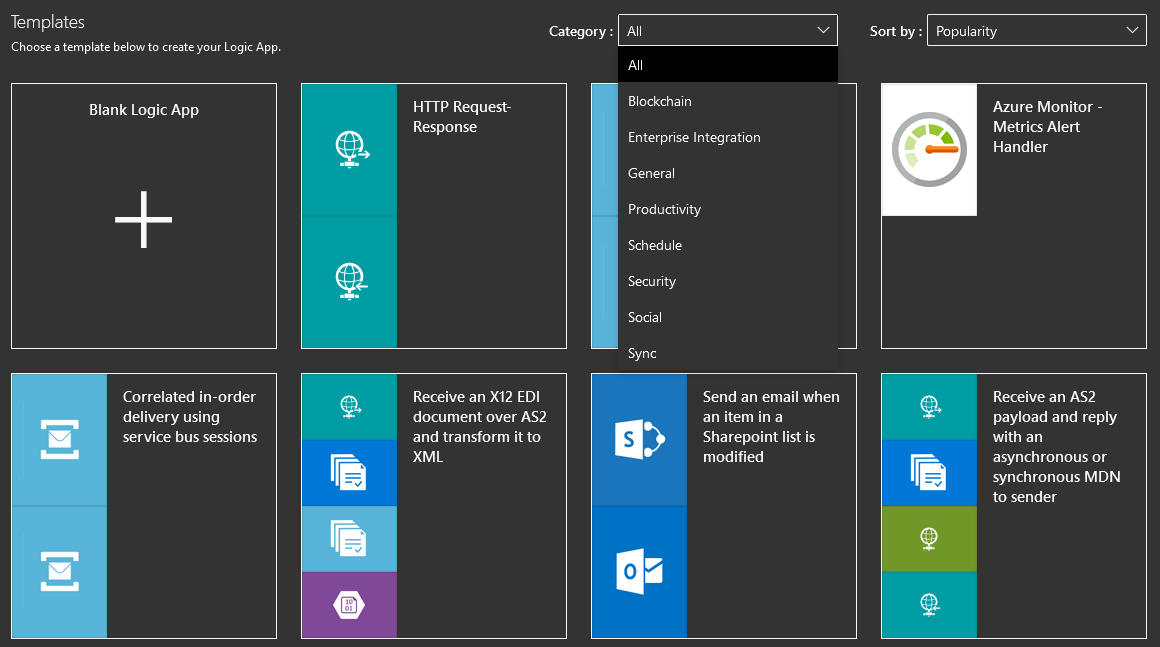


Azure Logic App provides its own set of templates, more technical-oriented


If you create a custom workflow on Power Automate, it can be exported to a JSON file which can then be imported into Azure Logic App. This is a great way to migrate a custom workflow created by a Business user; for example, to be evolved into a more elaborate process and then shared with the team.

Every flow starts with a trigger, either instant or scheduled, followed by a series of actions. Triggers and actions, may or may not establish a connection to a data source. Examples of triggers include, a file created or HTTP request received, a record created in SQL Server or Dynamics 365. Triggers can also be initiated from other vendor products such as Salesforce, Bitbucket or Gmail and more.

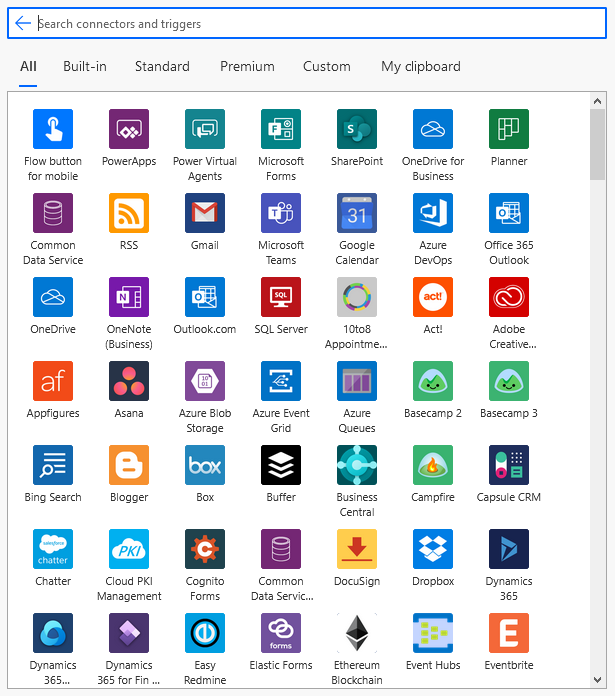
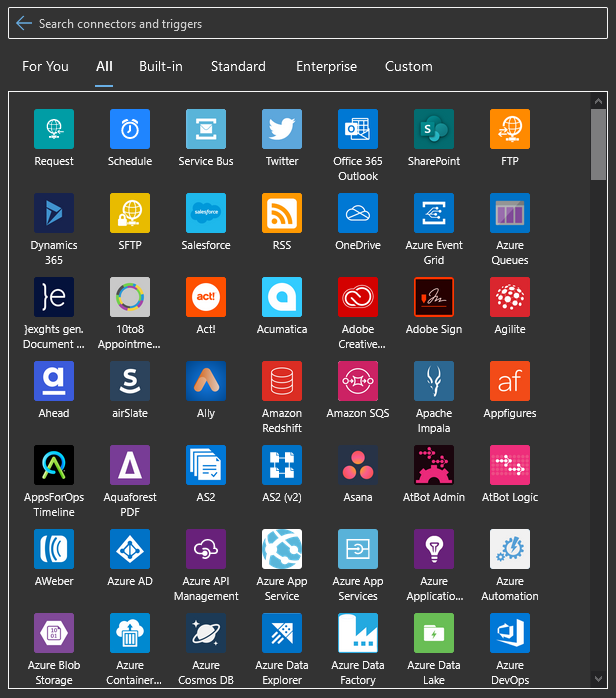
Both platforms offer similar connectors, triggers and actions.


A partial view of the supported connector and triggers in Power Automate


A partial view of the supported connector and triggers in Azure Logic App


The designer interface on both platforms is very user-friendly and identical in use, as you can see below. You edit a trigger or action by simply clicking on the box which expands with the properties available for customization. Additional settings can be updated by clicking on “...”. To insert new actions, click on the “(+)” or “New Step” button.
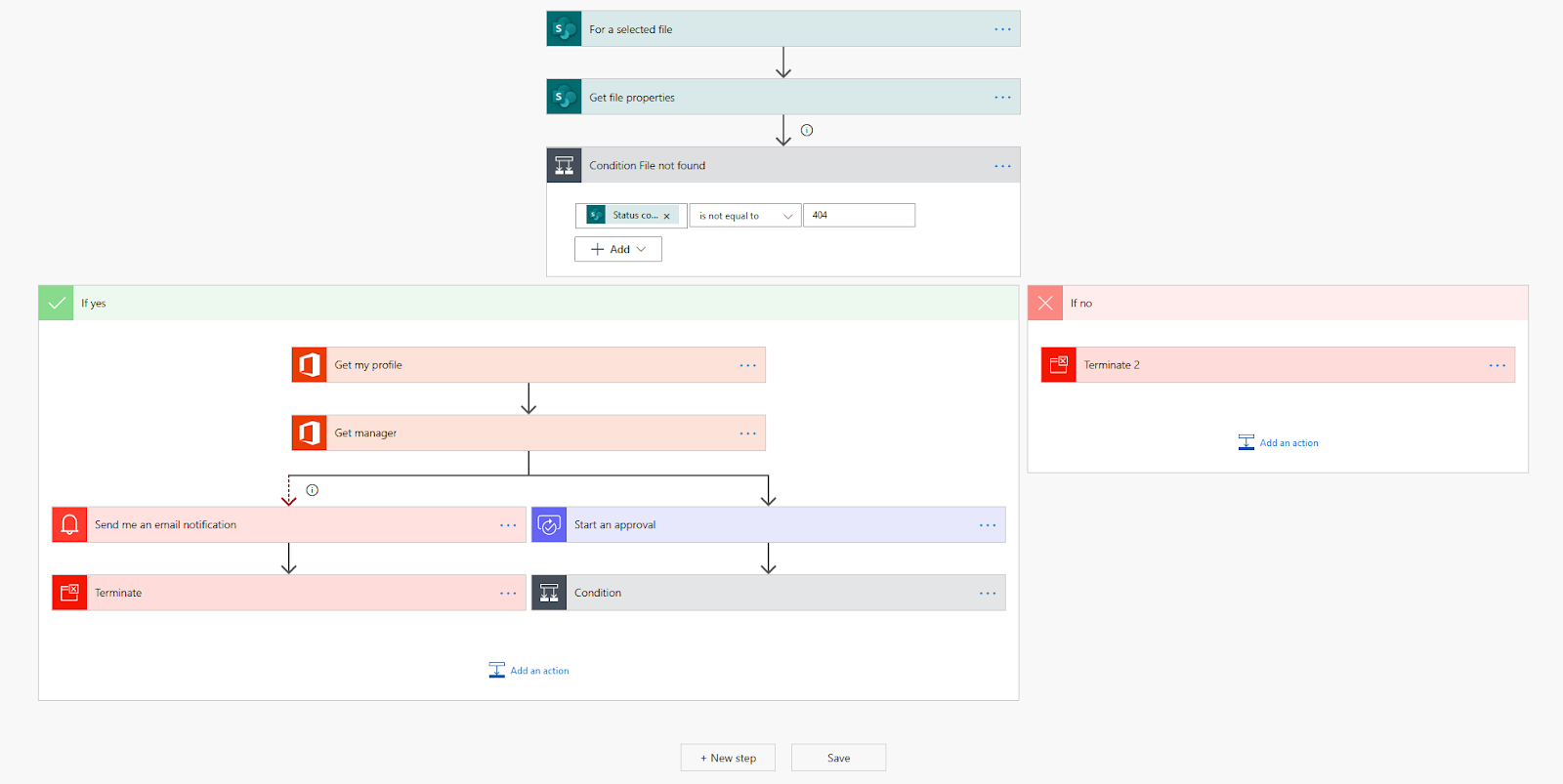


Workflow example in Power Automate, the designer is similar to Azure Logic App


To test the execution of your workflow on Power Automate, click on “Test”; on Azure Logic App, click on “Run”. In both cases, this action will execute your workflow.


Some tips for designing workflow:

  • Your workflow must be in Enabled state to be executed.

  • Always disable your workflow after design and test; this will ensure your recurring trigger does not automatically start your process or that it remains offline.

  • Azure Logic App keeps a history of every version you saved, so you can always go back to a previous version in case of accidental changes. This is not available on Power Automate, so remember to use the “Save As” feature to make backups.

  • Both platforms allow you to export the template to a JSON file, although some restrictions may apply to Power Automate.


The exported JSON template is a great option for IT professionals and developers to leverage ARM templates automation. By using Azure CLI or PowerShell, you can automate the creation of your Azure resource, along with Logic App.


What about on-premise connectivity?


Many enterprises may still be running an hybrid architecture, with part of their servers and databases still hosted on-premise, while new services are created on Azure. If your Power Automate or Azure Logic App requires a connection to data located on-premise, you do have a few options:

  • Create a Site-to-Site Virtual Private Network (S2S VPN) that establishes a connection between two endpoints: a VPN device on the on-premise network and an Azure VPN gateway on the Azure VPN. Traffic will travel over the public internet.

  • For better security and reliability, use ExpressRoute, which is a direct connection between your organization and Microsoft’s network. Traffic does not travel over the public internet.

  • To keep your architecture simple, you can install an on-premises data gateway. This will handle encrypted communication between the on-premises data gateway and Azure gateway cloud service, allowing Power Automate and Azure Logic App to access your organization’s data sources.


Power Automate or Azure Logic App?


If you are a productivity user, go with Power Automate; the Power Platform will manage all the required Cloud resources. You do have the option to share a workflow with others, granting them access to edit and execute your template.


If you are an IT professional or developer, the preferred solution is Azure Logic App. The benefits include:

  • Managed versioning of your Logic App on Azure portal.

  • Development using Visual Studio or Visual Studio Code.

  • JSON templates and parameter files for customization.

  • Deployment automation with Azure CLI or PowerShell.


And because you will be developing the solution for other users, the deployment model on Azure allows you to centralized the maintenance of your application without granting users access to modify your workflow.


Power Automate workflow is suitable for individual users who need their own custom processes. Azure Logic App is for workflow shared by multiple users or complex processes maintained by IT. This decision is also driven by their specific pricing model.


  • Power Automate license by user: $15 USD per user per month.

  • Azure Logic App is charged by execution: $0.000025 USD per action, and $0.000125 USD per Standard Connector.


Follow the links under References for more details on their pricing. Unless you have few power users who are creating a lot of workflows on Power Automate, Azure Logic App will be the most economical solution.


This article was an overview of Microsoft Power Automate and Azure Logic App, offering a brief comparison. I encourage you to log on Microsoft Flow and Azure Logic App to try them out and explore their potential for automation of your business.


Note

There is a bug caused by the workflow designer interface with the action “Create HTML table”. The property “Columns” is reset to “Automatic” each time it is open in the designer. If your workflow does not use the default value for this action property, you will need to edit each time you modify the workflow in the designer UI.


- Eric Chan


References

What is Common Data Service?

https://docs.microsoft.com/en-us/powerapps/maker/common-data-service/data-platform-intro


Common Data Model

https://docs.microsoft.com/en-us/common-data-model/


About Common Data Service

https://docs.microsoft.com/en-us/power-platform/admin/wp-cds-for-apps


Azure Integration Services white paper

https://azure.microsoft.com/mediahandler/files/resourcefiles/azure-integration-services/Azure-Integration-Services-Whitepaper-v1-0.pdf

On-premises data gateway architecture

Power Automate pricing

https://canada.flow.microsoft.com/en-us/pricing/

Logic Apps pricing

https://azure.microsoft.com/en-us/pricing/details/logic-apps/


The future is already in the Cloud

Why you need to move to the Cloud


The first public Cloud platform service was introduced by Amazon Web Services (AWS) in March 2006. Since then, many players have joined the market to offer a full range of services, including Microsoft Azure and Google Cloud Platform (GCP) among the most popular. While AWS remains the leader of the market, Microsoft and Google are seeing increased growth and could catch up to Amazon if it won’t keep innovating. This positive competitive market can only benefit the customers.


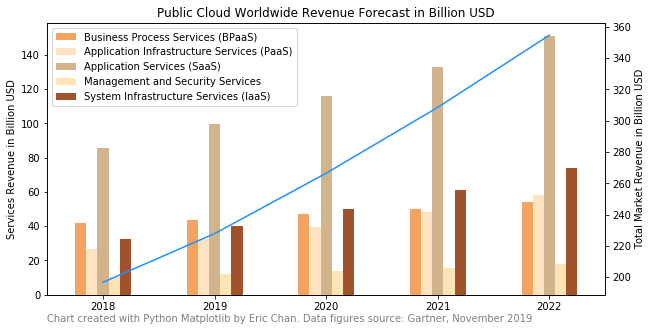
Public Cloud Worldwide Revenue Forecast 2018-2022 in Billion USD


Benefits of the Cloud over on-premise


Whether you are a small, medium or large enterprise, you may already have Websites hosted at a service provider, or your employees are using office tools such as Microsoft Office 365, or your custom applications are transferring data with external suppliers through hosted storage. These examples are use of Cloud services chosen by your company to lower costs or minimize administrative effort from maintaining your own infrastructure.


On premise expenses include cost of software licenses, server and network hardware, their power and cooling, the space they occupy, the personnel and maintenance. Moving to the Cloud will eliminate those operating expenditures. The Cloud platform pay-as-you-go pricing model allows you to easily adapt to your continuously evolving business needs without overcommitting budgets.


A few scenarios:

  • Were you planning a major project but were held back due to the estimated infrastructure capital expenditures your company would incur? Public Cloud provides the agility to spin-up resources easily without initial spending.

  • Is your report taking way too long to produce following a spike in volume? Public Cloud services are elastic and can easily scale-up to meet your demands.

  • Are your servers running 24/7 despite being accessed by users during work hours only? On the public Cloud you could easily shut them down during off hours or pay only for usage, depending on the service, hence cost savings.

  • Are your software versions months or years behind the latest update? Public Cloud offerings either Software as a Service (SaaS) or Platform as a Service (PaaS) will ensure their underlying software is up-to-date for features, optimization and security.


Designing custom applications could require large capital and operational expenditures as they require server and network infrastructure, specialized tools and licenses, skilled personnel to design, develop and maintain. With SaaS or PaaS products you can quickly start to build your personalized solution and cost will scale with your volume, meaning small enterprises will always pay less than larger enterprises.


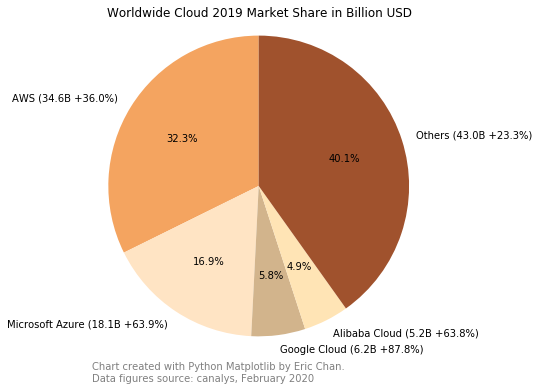
Worldwide Cloud 2019 Market Share in Billion USD and increase from previous year


Why choose public Cloud?


The definitive answer is to benefit from economies of scale, a massive pool of resources instantly available on pay-as-you-go, no extra cost, providing the agility you need to quickly start your IT initiative, being charged for compute, data storage or execution time.


To give you an idea of the pricing (all amounts are in USD), AWS storage service will charge you $0.023 per GB per Month for the first 50 TB, and price per GB goes down the more storage you use. With a durability of 99.999999999%, you will never find this level of reliability on premise or at private hosting services. Public Clouds have so many data centers, availability zones spread across multiple regions that storage space is by far the least expensive and most reliable resource.


Compute specific services such as AWS functions that execute custom code are charged by the number of requests and duration; $0.20 per 1M requests, $0.0000166667 for every GB-second, but also increases with memory allocation.


If you allocated 512MB of memory to your function, executed it 3 million times in one month, and it ran for 1 second each time, the Total charges = Compute charges + Request charges = $18.34 + $0.40 = $18.74 per month


VM, Infrastructure as a Service (IaaS) will still cost less than on-premise, but are not the optimal solutions. To fully benefit from public Cloud, you should rely solely on PaaS and SaaS offerings, such as Azure SQL services; consider to migrate all your IaaS as much as possible. Although database services, which combine compute and storage resources, are more expensive than simple storage or function services, they are much more performance and cost efficient than on VM.


For example, a managed Azure SQL instance with 8 vCore, 1.2 TB and 300 hours of activity would cost just under $750 per month, backup included. One vCore Gen5 is equivalent to one hyper-thread on an Intel E5-2673 v4 (Broadwell) 2.3-GHz and Intel SP-8160 (Skylake) processors, fast NVMe SSD.


Public Cloud massive infrastructure provides elastic computing, which is the ability to quickly scale processing power, memory and storage resources to meet your demands, and load balance your applications. Elasticity is typically automated without intervention or having to worry about purchasing and maintaining additional equipment.


Due to their exposure, public Clouds invest heavily into securing their infrastructure end-to-end, including hardware, software and operations. Microsoft has over 3,500 security experts and invests more than $1 B annually on cybersecurity. Public Clouds also meet major global or industry standard certifications and compliances.


Why not choose a public Cloud?


If you are a small enterprise and rent services from a private hosting company with no forecast for growth whatsoever, such as static Website or limited databases without IT employees doing maintenance, then you may not benefit financially from moving to a public Cloud. Many private hosting services have adjusted their pricing for small enterprises who have no need for resilient or scalable platforms.


A major concern is Personally Identifiable Information (PII) and their compliance with government regulation. Several countries have strict rules on their citizen data residency location. It is important to understand those regulations and the data your company stores. Public Cloud owns infrastructure across many geographical locations but not in every country. Be sure to look up the following pages if this is a concern for your company. In addition to meeting compliance, choosing the right location could see benefit from improved latency time.


AWS: https://aws.amazon.com/about-aws/global-infrastructure/regions_az/?p=ngi&loc=2

Azure: https://azure.microsoft.com/en-gb/global-infrastructure/geographies/


In order to store securely PII data on public Cloud, you will need to follow the best practices for securing your virtual network, sensitive data and encryption; although this applies to on premise as well.


Which Cloud to choose?


The top Cloud platforms offer similar services, covering the most popular needs, but each has their pros and cons that may determine which is a better fit, depending on your current IT infrastructure and technology. This section will focus solely on the current top 2 players, AWS and Azure.


After 14 years, AWS is the most mature platform with the most stable offerings. Azure launched 10 years ago, it is still going through a lot of changes and its services keep evolving. By the end of 2019, Azure SQL Data Warehouse was redesigned and renamed Azure Synapse Analytics, which would have impact your data analytics systems implementation if you were using that service.


If your enterprise relies mainly on Microsoft ecosystem, from Windows O/S, MS Office tools, Windows and SQL server to .Net applications you may think Azure would be de-facto choice, however AWS also provide managed Microsoft Active Directory Service which is key for seamless security management for enterprise on Windows O/S. AWS also support most if not all Microsoft technology. For Web applications, AWS supports .Net among other popular frameworks such as Java, PHP, Python, just like Azure.


Since databases are becoming the most business critical asset for most companies, the deciding factor may come down to which database engine is used across your systems; this decision will be impacted by staff skills and applications connectivity. For enterprises mainly relying on Microsoft SQL Server databases, Azure platform will provide a seamless transition, while AWS primary database engine is MySQL; both support Oracle.


Those platforms provide multiple Cloud management and automation tools. Their interfaces are unique and could also be a deciding factor. With free trial options available, make sure to ask your leading staff to explore their features as you need to consider an organization-wide strategy to structure your Cloud architecture and the basis differs slightly between AWS and Azure.


Feature-wise, both public Cloud platforms are highly capable to cover your business and technical needs. As previously mentioned, staff skills and learning curve will be a determining factor. A proper inventory of all your company technological assets and people skills is a prerequisite to identify which Cloud will be most suitable. Of course, the transition must be planned by phases to limit impact on business continuity. For now, I hope you learnt something from this article and that I instilled your interest in public Cloud technology.


- Eric Chan


References


How to run dbt on Docker

  How to configure a local dbt development environment for free In this article, we will learn how to configure a local dbt development envi...